
How to Do the AI Zombie Trend: Free Tools & Prompts
The zombie trend is the AI video that took over TikTok and Reels in early October 2026: one person has turned into a zombie, the other raises a gun, can't fire, and the hug cuts to a happy memory. This zombie trend tutorial shows you exactly how to make one, with free tools, copy-paste prompts and the fixes for the problems everyone runs into.
Quick answer
- You need two photos: the person (or pet) who turns into the zombie, and you.
- The story has four beats: zombie reveal, gun raised, gun lowered and hug, match cut to a warm memory.
- Fastest way: upload both photos to a zombie trend video generator that already has the story built in. No prompt, about 15 seconds of video.
- DIY way: Seedance 2.5 in Dreamina or Dola, or Google Flow's free daily credits, with one of the prompts below, then CapCut for the sound.
What Is the AI Zombie Trend?
The AI zombie trend (also called the zombie love story, AI zombie hug or zombie wife trend) is a short vertical video made from two ordinary photos. It is a story, not a filter:
- Someone you love stands in a dark, ruined place, and they've turned into a zombie.
- You raise a gun with shaking hands, then recognize them.
- You lower the gun and open your arms. Instead of attacking, they stumble into a hug.
- The hug match-cuts to a warm memory of the two of you: same pose, golden light, both of you healthy.
The format started on TikTok and Instagram Reels in the last week of September 2026. Google Trends shows searches for "zombie trend" near zero before September 24, climbing from September 27 and peaking on October 4–5. By then creators in English, Spanish, Indonesian, Russian and Portuguese were posting their own versions, and it had spread from couples to parents, best friends and pets.
Examples of the format: zombie boyfriend, zombie wife and zombie dog.
Here is how a 15-second version is usually paced:
| Time | Beat | What the viewer sees |
|---|---|---|
| 0–4s | The reveal | Cold blue light, ruined room, your loved one as a pale, clouded-eyed zombie |
| 4–7s | The standoff | Close-up of you raising the gun, eyes wet, hands shaking |
| 7–11s | The choice | The gun comes down, arms open, the zombie walks into the hug |
| 11–15s | The memory | Match cut on the hug into a sunny, happy moment from before |
What You Need Before You Start
- Photo 1, the one who turns: a sharp, front-facing photo in daylight. This is the hardest face for AI to keep once the zombie makeup goes on, so give it your best picture. No sunglasses, heavy filters or side angles.
- Photo 2, the survivor: usually you. A selfie is fine.
- One person per photo. If you only have a couple photo, crop it into two separate portraits.
- Permission. Use your own photos, or photos of people who agreed to it. Skip children and celebrities: many tools block them anyway.
- A sound idea for TikTok or Reels (see the sound section).
Method 1: Make It From Two Photos, No Prompt
If you just want the video, this is the shortest route. Our AI zombie trend generator runs ByteDance's Seedance model with the whole story already written, including the match cut.
- Pick who turns: partner, family member, best friend or pet.
- Upload two photos: the one who turns first, then you.
- Choose a format: 9:16 for TikTok, Reels and Shorts, or 16:9 for a wider cut.
- Generate and download. A 15-second video takes about 4–5 minutes to render.
What you skip: writing a prompt, stitching clips in CapCut, and the face-swapping problems covered below. What it costs: creating an account is free and each video uses credits, with the exact amount shown on the button before you start. Packs start at $9.90 on the pricing page, with no subscription.
Method 2: Dreamina or Dola (Seedance 2.5)
Many of the viral zombie videos were made with ByteDance's Seedance models, and the two easiest places to use them are Dreamina, CapCut's AI creation site, and Dola, ByteDance's AI assistant app (it used to be called Cici). Seedance 2.5, released in July 2026, can make a single clip of up to 30 seconds from reference photos, so the whole story fits in one generation.
Pick Seedance 2.5, not 2.0. In Dreamina's model menu, Seedance 2.0, 2.0 Fast and 2.0 Mini are all marked "Real human faces are not supported", so they won't work with photos of real people. Seedance 2.5 has no such note and takes up to 50 references.
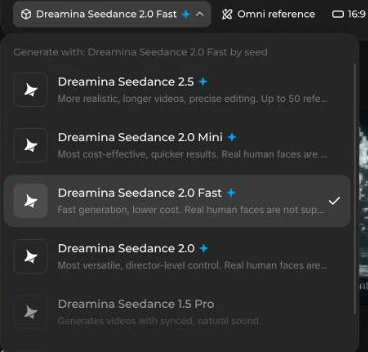
Here's how to do it in Dreamina (we walked through these steps on October 8, 2026):
- Open Dreamina, sign in and stay on the AI Video tab.
- Open the model menu and choose Dreamina Seedance 2.5.
- Keep the mode on Omni reference, click Reference and upload both photos: the one who turns first, then you.
- Paste the one-clip prompt. Where it says "the first photo" and "the second photo", you can type @ and pick each upload instead, so the model knows exactly which face is which.
- Set the ratio to 9:16, the resolution to 480P or 720P, and the duration to 15s.
- Check the credit cost next to the generate arrow, generate, and download. If the faces drift, regenerate before you start editing.

What it costs: a free Dreamina account gets 120 free credits a day. When we checked, a 15-second 9:16 Seedance 2.5 video cost 255 credits at 480P (85 credits for 5 seconds), and 720P costs more. So one day of free credits covers about 7 seconds, not the full story. You'll need a paid plan, which starts at $15 a month, often with a big first-month discount.
Dola: the same Seedance 2.5 model in a phone app. Its free plan has a daily video limit, and it isn't available in every country; one October 2026 review says it isn't offered in the US. A viral Indonesian version of the trend covered by local news was made in Dola.
Watch out for: Seedance models are strict about weapons and violence. If your prompt is refused, see troubleshooting.
Method 3: Google Flow (Veo 3.1) + CapCut
Google Flow is the most generous free option right now: people without a Google AI subscription get 50 free credits a day for Veo 3.1 models, according to Google's Flow help page. Credits don't roll over, and Veo 3.1 Lite is the cheapest model to spend them on.
The catch is length. Veo clips top out at 8 seconds, so you build the story from two clips:
- Open Flow and start a new project.
- Use Ingredients to Video and add both photos so the faces come from your pictures.
- Generate clip 1 (the reveal and the standoff) with the two-clip prompt.
- Generate clip 2 (the hug and the memory). If you can set a start frame, use the last frame of clip 1 so the room and outfits match.
- Import both clips into CapCut, put them back to back, and cut on the movement of the hug.
- Add your sound, export at 9:16 and post.
Watch out for: faces changing between clip 1 and clip 2. Regenerate the clip that drifted instead of trying to fix it in editing.
Method 4: PixVerse and CapCut Templates
PixVerse has one-tap effect templates, including a zombie transformation effect that turns a single photo into a few seconds of zombie footage. It's fun, but it's one person and no story, so you'd still need a separate hug clip and an edit to get the trend.
CapCut is the editor almost everyone uses for the final cut, but there is no official CapCut template for the 2026 zombie love story. The "Zombie AI trend" template you'll find in CapCut dates from 2023 and is a different effect. Use CapCut to join clips, add the sound and captions, not to generate the story.
Which Zombie AI Tool Should You Use?
| Tool | Model | Free option | Clip length | Prompt needed | Best for |
|---|---|---|---|---|---|
| Zombie Trend | Seedance 2 | Free account, videos use credits | One 15s clip | No | Fastest result, no editing |
| Dreamina | Seedance 2.5 (2.0 models block real faces) | 120 credits a day; a 15s 480P video costs 255 | One clip, up to 30s | Yes | Best quality in one generation |
| Dola | Seedance 2.5 | Free plan with a daily video limit | One clip | Yes | Doing it on your phone |
| Google Flow | Veo 3.1 | 50 free credits a day | 8s, so two clips + CapCut | Yes | Free, if you don't mind editing |
| PixVerse | PixVerse | Free credits | A few seconds per effect | No for effects | Zombie face only, not the story |
| CapCut | Editor | Free | n/a | No | Stitching, sound and captions |
Free quotas checked on October 8, 2026. They change often, so check the app before you plan around them.
Zombie Trend Prompts to Copy
Each prompt refers to "the first photo" and "the second photo" instead of tool-specific tags, so it works in Dreamina, Dola, Flow and most other image-to-video tools. Always upload the photo of the one who turns first. Replace anything in [brackets].
Prompt 1: The Classic Couple Version (One Clip)
15-second vertical cinematic short film, photorealistic, live action.
The first photo is the person who has turned into a zombie. The second photo is the survivor. Keep both faces exactly like their photos in every shot. Never swap faces. No other people.

0-4s: A dark apartment hallway, cold blue light, one ceiling lamp flickering. The person from the first photo stands at the end of the hall as a zombie: pale grey skin, clouded eyes, torn clothes, still clearly recognizable.
4-7s: Close-up of the survivor raising a handgun with shaking hands, tears in their eyes. They recognize who it is.
7-11s: The survivor slowly lowers the gun and opens their arms. The zombie stumbles forward and hugs them instead of attacking. The camera slowly circles the hug.
11-15s: Match cut on the hug, same pose and framing, into a warm golden-hour memory on a beach: both of them healthy, laughing and holding each other.

Cold desaturated colors for the apocalypse, warm golden colors for the memory. No blood, no bites, no gore. No text, no subtitles, no dialogue. Soft piano music.
Prompt 2: Zombie Dog or Cat Version
15-second vertical cinematic short film, photorealistic.
The first photo is my [dog/cat], who has turned. The second photo is the owner. Keep the pet's face, fur color and markings and the owner's face exactly like the photos. No other people or animals.

0-4s: A foggy backyard at dusk, cold blue light, a broken fence. The pet from the first photo stands in the grass as a zombie: dull matted fur, clouded eyes, slow stiff steps, still clearly the same pet.
4-7s: Close-up of the owner raising a handgun with shaking hands, crying as they recognize their pet.
7-11s: The owner lowers the gun, kneels and opens their arms. The pet walks in slowly and presses its head against the owner's chest.
11-15s: Match cut on the hug, same framing, into a sunny summer afternoon in the same backyard: the pet healthy and wagging, playing with the owner.

Cold grey colors first, warm golden light for the memory. No blood, no gore. No text, no subtitles.
Prompt 3: Mom or Dad Version
15-second vertical cinematic short film, photorealistic.
The first photo is my [mom/dad], who has turned into a zombie. The second photo is their adult child, the survivor. Keep both faces exactly like their photos. Never swap faces. No other people.

0-4s: An empty supermarket at night, shelves knocked over, emergency lights buzzing. The parent from the first photo stands in an aisle as a zombie: pale skin, clouded eyes, torn cardigan, still clearly recognizable.
4-7s: Close-up of the survivor raising a handgun, hands trembling, silently mouthing their name.
7-11s: The survivor lowers the gun and steps forward. The parent shuffles closer and wraps them in a hug.
11-15s: Match cut on the hug into a bright autumn afternoon in a park: the parent healthy and laughing, the two of them walking arm in arm through falling leaves.

Cold desaturated colors first, warm golden colors for the memory. No blood, no gore. No text, no subtitles, no dialogue.
Prompt 4: Best Friend Version
15-second vertical cinematic short film, photorealistic.
The first photo is my best friend, who has turned into a zombie. The second photo is me, the survivor. Keep both faces exactly like their photos. Never swap faces. No other people.

0-4s: An abandoned parking garage at night, a single flickering light, rain dripping. The friend from the first photo stands between two cars as a zombie: grey skin, clouded eyes, torn hoodie, still clearly recognizable.
4-7s: Close-up of the survivor raising a handgun, jaw clenched, eyes filling with tears.
7-11s: The survivor drops the gun to their side and opens their arms. The friend staggers forward into a tight hug.
11-15s: Match cut on the hug into a summer beach at sunset: both of them healthy, laughing and splashing water at each other.

Cold blue-grey colors first, warm sunset colors for the memory. No blood, no gore. No text, no subtitles.
Prompt 5: Two-Clip Version for Google Flow or Other 8-Second Tools
CLIP 1 (8 seconds):
Vertical cinematic shot, photorealistic. The first photo is the person who has turned into a zombie, the second photo is the survivor. Keep both faces exactly like their photos. A dark abandoned living room at dusk, cold blue light, dust in the air. The person from the first photo stands in the doorway as a zombie: pale grey skin, clouded eyes, torn clothes, still recognizable. Cut to a close-up of the survivor raising a handgun with shaking hands, tears in their eyes, slowly recognizing them. No blood, no text.

CLIP 2 (8 seconds):
Same room, same lighting, same two people and outfits. The survivor lowers the gun and opens their arms. The zombie stumbles forward and hugs them. Match cut on the hug, same pose and framing, into a sunny meadow at golden hour: both of them healthy, smiling and holding each other. Warm golden colors, soft piano. No blood, no text.
How to Nail the Hug-to-Memory Transition
The match cut is what makes people rewatch. A few things make it land:
- Say it in the prompt: "match cut on the hug, same pose and framing". Without it, most models fade or jump to an unrelated shot.
- Keep the contrast: cold, desaturated colors before the cut and warm golden light after. The color change sells the time jump.
- In CapCut, cut at the moment the hug closes, not after it. If the poses don't line up, a 0.2-second white flash or a very short dissolve hides the seam.
- Put the memory somewhere specific: a beach, a kitchen, a first date. "A happy place" gives you generic stock footage.
What Sound Is Used for the Zombie Trend?
There is no single official sound. Creators use soft piano, slowed love songs and whatever emotional audio is trending that week. The easiest way to match what's working right now: open a recent zombie trend video on TikTok, tap the sound at the bottom, and choose Use this sound. Posting with a trending sound also puts your video on that sound's page.
If the model added its own music or random voices, mute the original audio in CapCut or TikTok before adding yours.
Troubleshooting: Faces, Blocked Prompts and Gore
The zombie doesn't look like my partner. Zombie makeup makes Photo 1 the hardest face to keep. Use a sharp, front-facing daylight portrait, make sure that photo is uploaded first, and keep "still clearly recognizable" in the prompt.
The two faces swap or blend. Add "Never swap faces" and "No other people", and use one person per photo. Group shots and couple photos confuse every model.
My prompt or video was blocked. Tools are strict about weapons and violence. Keep the gun lowered, never fired, and remove words like "shoot", "kill" or "trigger". Keep "no blood, no bites, no gore" in the prompt. Photos of minors or public figures can also get you blocked.
It looks like a horror movie instead of a love story. Spend more of the prompt on the hug and the memory than on the zombie, and name the emotions: tears, shaking hands, relief.
The memory scene has different people in it. Repeat "both of them" in the memory line and keep "No other people" in the prompt.
If you'd rather skip this part, the zombie trend generator handles photo order, face lock and the match cut for you.
FAQ
Is the AI zombie trend free to make?
Partly. Google Flow gives non-subscribers 50 free credits a day, and CapCut is free for editing. Dreamina's 120 free daily credits cover only about 7 seconds of Seedance 2.5 at 480P, so a full 15-second version needs a paid plan, and Dola's free plan has a daily video limit. The free routes take longer and need a prompt; a dedicated generator costs credits but takes one step.
What app is the zombie trend made with?
Many viral versions were made with ByteDance's Seedance models through Dreamina, Dola or CapCut, then edited in CapCut. Google Flow (Veo), Kling and PixVerse are also used. There isn't one official app.
Is there a CapCut template for the zombie trend?
Not for the 2026 love-story version. The "Zombie AI trend" template in CapCut is from 2023 and does something different. People generate the video with an AI model and use CapCut only to edit it.
Is Seedance 2.5 free?
Not really. Dreamina gives 120 free credits a day, but a 15-second 480P Seedance 2.5 video cost 255 credits when we checked on October 8, 2026. Dreamina ran a short free Seedance 2.5 promotion in August 2026, and Dola's free plan includes a limited number of videos per day. Videos promising "unlimited free Seedance 2.5" usually describe a temporary offer.
Can I do the zombie trend with one photo?
You need one photo of each person. If you only have a photo of the two of you, crop it into two portraits. Single-photo tools like zombie filters only change one face; they can't make the hug story.
Can I do it with my dog or cat?
Yes. Use your pet as the first photo and yourself as the second, and use the pet prompt above. Pick a photo where the whole face and both eyes are visible.
Is the zombie trend a filter?
No. A zombie filter changes your face in real time. The zombie trend is a short AI-generated film with a story: the standoff, the hug and the memory.
What is "My Zombie Sweetheart"? Is it the same trend?
"My Zombie Sweetheart" is the title of a zombie-romance short drama circulating on video sites, about a girl who becomes a zombie but keeps her mind, and of a 2020 novel. It isn't a CapCut template, a TikTok sound or the way the AI trend is made. People search for both because the idea is the same: loving someone after they've turned.
Do I have to label my zombie video as AI?
TikTok asks creators to label realistic AI-generated content, so turn on the AI-generated label when you post. TikTok can also add the label itself or remove unlabeled AI content.
How long should a zombie trend video be?
Most are 10 to 15 seconds. That's enough for all four beats and short enough that people watch it twice.
Make Your Own Zombie Trend Video
The trend works because of the story, not the effects: someone turns, you can't do it, and the memory says the rest. Pick your method above, or upload two photos to the zombie trend video generator and have your version ready in a few minutes.